Object Memory Layout
Inspect how a JVM represents an object: header, class pointer, fields, alignment, and size estimates.
Object Header
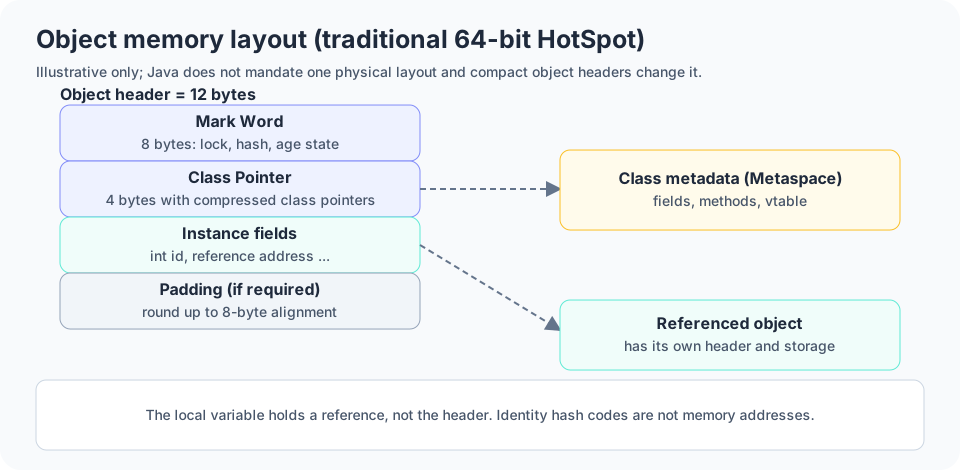
Object memory layout describes how a JVM represents an object in memory, including its header, instance fields, and any padding needed for alignment. Java does not mandate one exact physical layout for every JVM.
In a traditional 64-bit HotSpot configuration with compressed class pointers, an ordinary object commonly has a 12-byte header: an 8-byte Mark Word and a 4-byte Class Pointer. Instance data follows, and padding may be added to meet alignment requirements. Compact Object Headers can change this layout.
The header is JVM metadata. It supports runtime type identification, synchronization-related state, identity hash handling, and collector-specific needs.
class Employee {
    int id;
    double salary;
}

Employee employee = new Employee();Mark Word
In traditional HotSpot layouts the Mark Word commonly occupies 8 bytes on a 64-bit JVM. Depending on object state and JVM implementation, it can encode information about locking, identity hash codes, age, or other runtime state. Its exact bit layout varies across JDK versions and configurations.
A synchronized method illustrates monitor-based synchronization. System.identityHashCode returns an identity hash code, not a memory address, and values are not guaranteed to be unique. HotSpot may keep identity-hash information in header-related state, but this is implementation-specific.
class Counter {
    int count = 0;

    synchronized void increment() {
        count++;
    }
}

Counter c = new Counter();
System.out.println(System.identityHashCode(c));Klass Pointer
In HotSpot terminology the Class (Klass) Pointer is an internal reference to runtime metadata describing an object's class. That metadata helps the JVM implement runtime type checks, virtual method dispatch, and access to class-layout information.
With compressed class pointers the pointer commonly uses 4 bytes in a traditional 64-bit layout; without compression it may use 8 bytes. These sizes depend on configuration, and Compact Object Headers provide another layout option in certain HotSpot releases.
class Animal { int age; }
class Dog extends Animal { String breed; }

Dog dog = new Dog();Instance Data
Instance data stores an object's non-static fields. Primitive fields store their values in the object representation, while reference fields store references to other objects. The referenced objects have their own storage.
Static fields belong to the class rather than being duplicated in every object.
class Address {
    String city;
}

class Employee {
    int id;
    Address address;
}

Employee employee = new Employee();Object Alignment
Object alignment means an object's allocation conforms to alignment rules used by the JVM. Traditional HotSpot configurations commonly use 8-byte alignment, and padding may be added so the total allocated size is a multiple of the alignment.
For example, if a hypothetical object needs 21 bytes before alignment and the alignment is 8 bytes, the allocation rounds up to 24 bytes with 3 bytes of padding. This is a mathematical illustration, not the size of a particular class; actual field ordering and padding depend on the JVM.
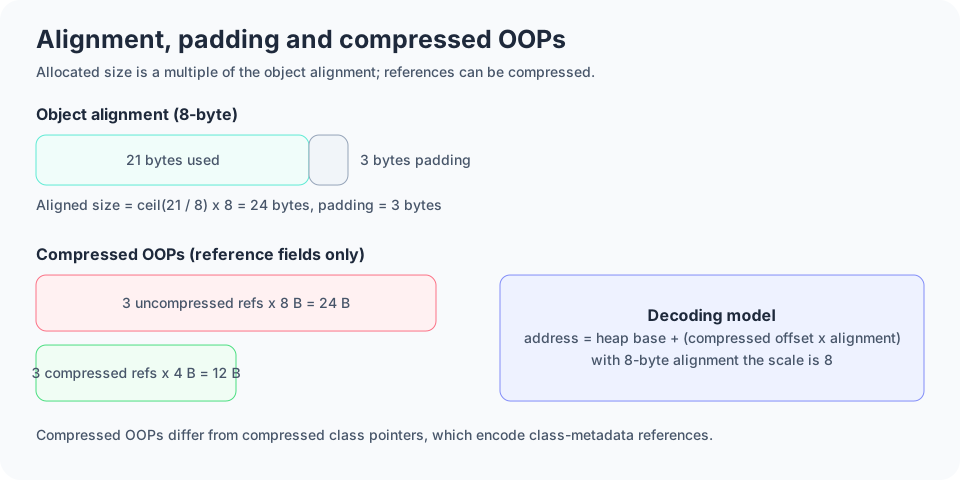
Aligned size = ceil(21 / 8) x 8
             = 3 x 8
             = 24 bytes
Padding = 24 - 21 = 3 bytesCompressed OOPs
OOPs means Ordinary Object Pointers in HotSpot terminology. Compressed OOPs let many heap object references be represented as 32-bit encoded values instead of full 64-bit pointers in supported configurations, reducing heap use for applications with many references.
If three references each used 8 bytes, the fields would occupy 24 bytes; as 4-byte compressed references they occupy 12 bytes. This comparison covers only the reference fields, not total object size.
With a common 8-byte alignment the scale factor in the simplified decoding model is 8. Exact encoding depends on JVM configuration. Compressed OOPs are distinct from compressed class pointers, which encode references to class metadata.
class Department {
    String name;
    Employee manager;
    Employee assistant;
}

// Conceptual decoding model
// address = heap base + (compressed offset x alignment)Object Size Calculation
A simplified estimate is: header size + instance field storage + padding required by alignment. The exact layout depends on the JVM, the class, reference compression, alignment, and layout rules. A Java boolean does not have one universally mandated physical field size.
Example 1 assumes a 12-byte header, compressed class pointer, 4-byte int and 8-byte alignment: 12 + 4 = 16 bytes, already aligned. Example 2 (int plus a reference) is 12 + 4 + 4 = 20 bytes, rounded up to 24. Example 3 (int, reference, long) has 16 bytes of fields; with the header that is 28 bytes before tail padding, rounding to 32. Actual JVM field layout may differ.
The size of an object is not the total footprint of everything it references. To measure a running JVM, use Java Object Layout (JOL), heap dumps, and profilers.
| Type | Language-level width / note |
|---|---|
| byte | 1 byte |
| char | 2 bytes |
| short | 2 bytes |
| int | 4 bytes |
| float | 4 bytes |
| long | 8 bytes |
| double | 8 bytes |
| boolean | Physical field storage is JVM-dependent |
class Employee { int id; }                      // 16 bytes
class Employee { int id; String name; }         // 20 -> 24 bytes
class Record { int id; Object ref; long value; } // 28 -> 32 bytes