JVM Diagnostic Tools
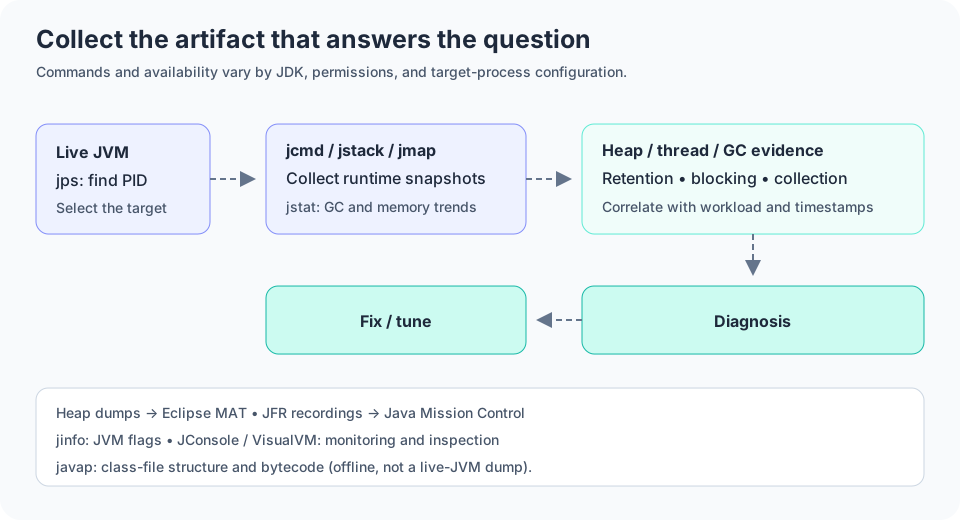
Use JVM command-line and GUI tools to inspect runtime health and performance.
jps
jps lists JVM processes running on the machine and their identifiers.
It is a quick way to identify the Java process you need to inspect.
jstack
jstack prints thread dumps and stack traces from a running JVM.
It is used to diagnose deadlocks, dead waiting states, and high CPU consumption.
jmap
jmap reports heap usage, memory mappings, and heap dump options for a JVM process.
It helps inspect object retention and identify memory pressure.
jcmd
jcmd sends diagnostic commands to a running JVM process and exposes advanced management features.
It is one of the most flexible tools in the JDK toolset.
jstat
jstat provides JVM statistics such as class loading, memory usage, and GC activity over time.
It is useful for trend analysis and runtime monitoring.
jinfo
jinfo prints configuration and JVM flags for a running Java process.
It is helpful for verifying settings such as heap size and GC selection.
javap
javap disassembles class files and prints their structure and bytecode.
It is frequently used to inspect compiled code and verify the bytecode generated by the compiler.
jconsole
jconsole provides a graphical monitoring view of heap, threads, and CPU usage.
It is useful for quick diagnostics without writing custom tooling.
VisualVM
VisualVM is a richer GUI-based diagnostic tool for profiling, heap inspection, and thread analysis.
It integrates well with JFR and can help find performance bottlenecks quickly.
Eclipse MAT
Eclipse MAT is a heap analysis tool used to inspect memory snapshots and identify retained objects.
It is particularly helpful when diagnosing memory leaks and large retention trees.
JMC
Java Mission Control is a monitoring and analysis suite built around JFR data.
It provides deep insights into runtime events and JVM behavior over time.
JFR
Java Flight Recorder captures low-overhead profiling and diagnostic events.
It has become a standard tool for production-grade JVM analysis.