Java Architecture Basics
Understand the Java platform, distinguish development tools from the runtime, and follow source code through compilation to portable bytecode and native execution.
The Java platform: tools, libraries, and execution
The Java platform is an environment for both developing and running applications. It combines development tools, standard class libraries, and a virtual machine. The language describes the program; the platform supplies the compiler, APIs, and runtime services that make it usable.
Java's object-oriented model organizes state and behavior into classes and objects. Its standard APIs support threads, networking, file access, and other common tasks, while the runtime provides services such as class loading, bytecode verification, and automatic memory management.
Portability, robustness, security mechanisms, and high performance are design goals rather than unconditional guarantees. Applications still need correct synchronization, sensible resource management, secure dependencies, and a compatible runtime.
- Development: write, compile, inspect, debug, and package an application.
- Runtime: provide the libraries and supporting files required by the application.
- Execution: load and verify classes, execute instructions, and manage memory.
JDK vs JRE vs JVM
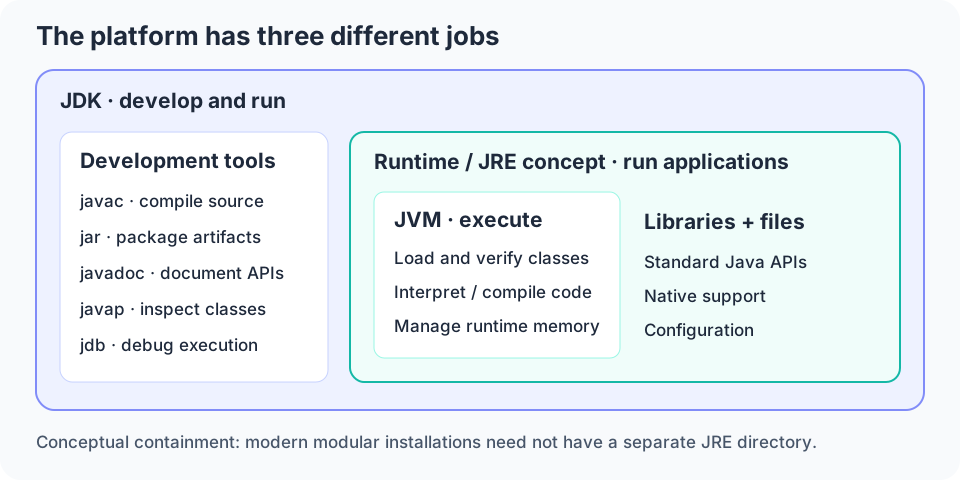
The Java Development Kit (JDK) supplies a runtime plus development utilities. The javac compiler translates Java source into class files; java launches applications; jar packages classes and resources; javadoc creates API documentation; and tools such as javap and jdb support inspection and debugging.
The Java Runtime Environment (JRE) is the runtime concept: a JVM, Java class libraries, and supporting configuration and native files. The JVM is the execution component within that environment, not a complete development kit or a replacement for the standard libraries.
The familiar JDK contains JRE contains JVM diagram is a useful responsibility model, not a promise about directories in every installation. Modern modular JDKs commonly have no separate jre directory, and standalone JRE availability depends on the distributor. A custom runtime image can contain just the modules an application needs.
| Component | Primary job | Compiler included? | Typical audience |
|---|---|---|---|
| JDK | Develop and run applications | Yes: javac | Developers, build systems, and runtime operators |
| JRE / runtime image | Run applications with required libraries | Not normally | Deployment environments |
| JVM | Execute bytecode and provide runtime services | Not the Java source compiler | Used indirectly by both |
Follow a program from source to output
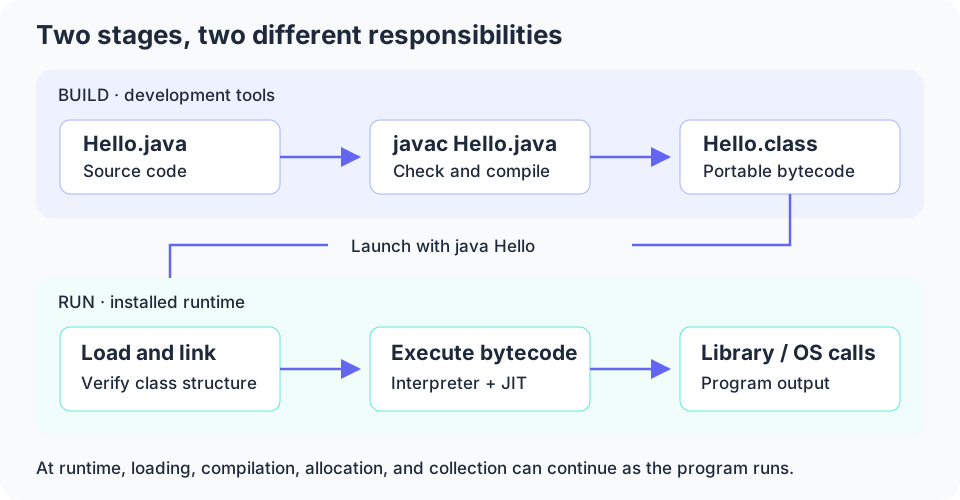
Start with Hello.java, which contains a class named Hello and its main method. Running javac Hello.java performs compilation and, when successful, produces Hello.class. The class file contains bytecode and structural information the JVM needs to understand the class.
Running java Hello asks the launcher to start a JVM and locate the Hello class. In this class-launch mode, use the class name rather than Hello.class. The JVM loads, links, and initializes classes as needed, then invokes main.
The execution engine runs the program using interpretation and, in a typical optimizing JVM, compiled native code. Library operations eventually interact with the operating system to display output. Class loading and compilation can continue during execution; this is not a one-time conveyor belt that finishes before all application work starts.
public class Hello {
    public static void main(String[] args) {
        System.out.println("Hello, Java");
    }
}

// Save as Hello.java
// Compile: javac Hello.java
// Run:     java Hello
// Output: Hello, JavaPlatform independence has a boundary
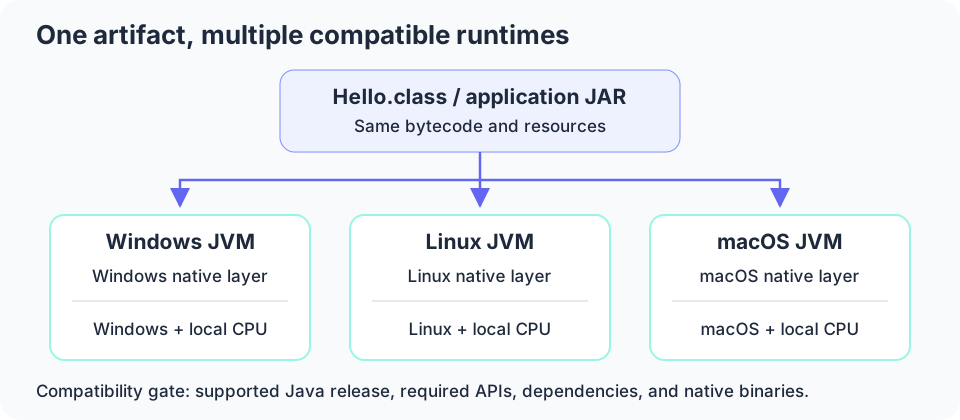
Java normally distributes bytecode rather than an executable compiled for one CPU and operating system. The same compatible class file can run on Windows, Linux, and macOS because each platform provides its own JVM implementation of the bytecode contract.
The JVM and its native libraries are platform-specific. An application does not carry a magical platform-independent CPU instruction set; it carries instructions that a compatible runtime can interpret or compile into instructions for the local processor.
Compatibility also includes the class-file version and required APIs. A class built for a newer Java release cannot generally run on an older JVM. When targeting an older supported release, javac --release selects that release's language level, class-file target, and supported platform API surface.
Write Once, Run Anywhere in practice
WORA describes writing an application once, compiling it into portable bytecode, and distributing that artifact to multiple compatible Java runtimes. It reduces the need to maintain a separate implementation and native build for each target operating system.
Using standard libraries helps preserve that benefit: a Java file API presents one application-facing contract even though the runtime uses different operating-system facilities underneath. A JAR can carry classes and resources without becoming tied to one processor architecture.
Portability must still be tested. Hard-coded path separators, case-sensitive filename assumptions, default encodings, time zones, platform-specific native libraries, and unavailable modules can all produce different results. WORA is not a promise that arbitrary environmental assumptions are portable.
Bytecode is an intermediate instruction format
Bytecode is the JVM instruction format generated by compilation. A .class file is more than a list of instructions: it also describes fields, methods, access flags, constants, and symbolic references to other classes and members.
Unlike machine code, bytecode is not directly executed as CPU instructions. An interpreter implements its behavior, while a just-in-time compiler can turn frequently executed methods or loops into native code. This separation lets the same artifact benefit from different runtime implementations and optimizations.
Verification checks structural and type-safety constraints before execution, including valid instruction operands and compatible operand-stack usage. It does not prove that the application has no bugs, that a downloaded library is trustworthy, or that native code is memory-safe.
static int add(int a, int b) {
    return a + b;
}

// Inspect a compiled class with: javap -c Hello
// A simple static add method has instructions like:
// iload_0  -- load a
// iload_1  -- load b
// iadd     -- add the two int values
// ireturn -- return the resultCompilation checks and runtime checks are different
javac parses source, resolves names and types, checks language rules, and emits class files. Syntax errors, incompatible assignments, inaccessible members, and many other invalid constructs are rejected before the application starts. Compilation does not establish that the business logic is correct.
A successful compilation may create several class files from one source file, for example when the source declares nested or additional classes. Class files can then be packaged into JARs together with resources for deployment.
At runtime, classes must still be found and linked against the environment actually installed. Missing dependencies, incompatible class versions, failed initialization, or changed library methods can prevent execution even when a previous build succeeded. Loading, verification, and execution have different responsibilities and different failure modes.
| Stage | Example problem | What to inspect |
|---|---|---|
| Source compilation | Assigning a String to an int | Compiler message and source types |
| Class loading / linking | A required class is absent at runtime | Classpath or module path and dependency versions |
| Execution | Null dereference or incorrect result | Stack trace, input, and application logic |
What the runtime supplies after compilation
The runtime supplies the JVM, standard class libraries, supporting native code, and configuration needed to execute the application. The java launcher starts the process and arranges the runtime environment; the JVM then coordinates class loading, execution, thread state, and managed memory.
For System.out.println, application code first uses the Java PrintStream API. The library and runtime eventually use platform-specific output facilities. The exact internal route varies by JDK and operation; not every library call must pass through a user-visible JNI method.
Automatic garbage collection reclaims unreachable managed objects, but it does not close every external resource or eliminate logical memory leaks. Close files and sockets appropriately, and avoid retaining objects in long-lived collections when they are no longer needed.